This isn’t specific to TangoPBX but it’s in the spirit of “free alternatives”: a nice WebRTC phone I discovered a couple months ago and have been playing with.
You need to enable the WSS transport in Asterisk SIP Settings, PJSIP, and allow access to port 8089 (secure websocket) between your client browser and the PBX.
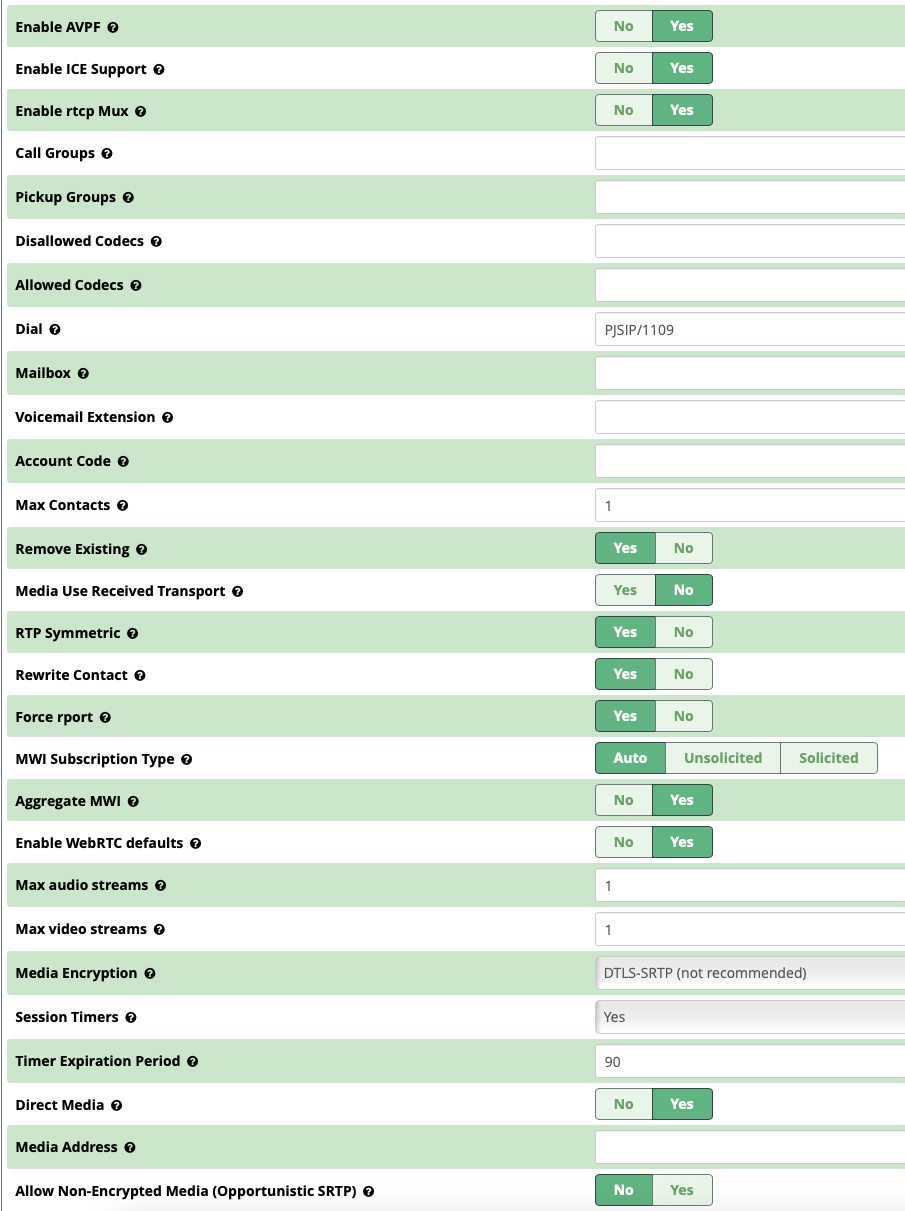
Create an extension with WebRTC defaults enabled: Extension –> Advanced tab –> Enable WebRTC defaults.
I installed the client just by copying the code from the Github repo to a directory under /var/www/html on the PBX. But it can be deployed anywhere.
Works great for audio and video calls as well as SMS with a few tweaks.
I tried to get this working by downloading the folder and uploading it to my freepbx’s www/html/bp folder. but there doesnt appear to be some index.html file or any of the sorts. any other suggestions?
In PBX, Advanced Settings, you may have had your websocket access automatically disabled by the recent FreePBX update - a workaround is in that post, but in short, go into advanced settings and find the HTTPS Bind Address and set it to ::0 instead of 127.0.0.1
Also, probably already set for you but for anyone else reading this, make sure you have WS/WSS enabled in Asterisk SIP Settings/PJSIP settings.
Thank you. I know what you meant. for anyone else that sees this make sure your Bind Address is ::0
Thanks for your help Bill. That is what I was missing.
I got it registered. but it wont make calls. I have read that WebRTC extensions can’t also be PJSIP at the same time? Did you make one specific for your test? It says (Not Acceptable Here)
I did make a separate extension for it. This is the advanced config. I don’t remember specifically selecting all these… some of them might be toggled on due to WebRTC Defaults (e.g. ICE, AVPF, RTCP mux)